What Is Catch-All Email? Risks & How to Handle Them
11 January 2026
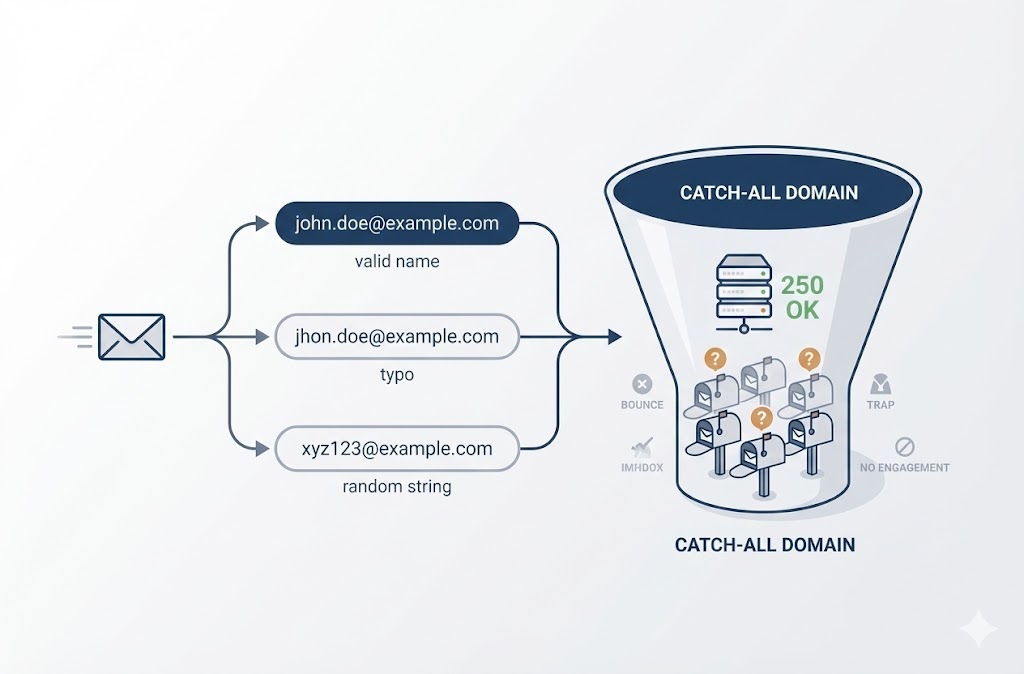
A catch-all email is a mail server configuration that accepts every message sent to a domain, even if the specific mailbox doesn’t exist. When your verification tool returns “catch-all,” it means the domain will accept the email—but you have no confirmation that anyone will receive it.
Table of Contents
- How Catch-All Emails Work
- Why Businesses Use Catch-All Emails
- The Problem for Email Senders
- Risks of Sending to Catch-All Emails
- How to Verify Catch-All Emails
- Should You Send to Catch-All Emails?
- Frequently Asked Questions
Key Takeaways:
- Catch-all domains accept all incoming emails regardless of the address
- Verification tools cannot confirm whether a specific mailbox exists on a catch-all domain
- Sending to catch-all addresses carries higher bounce and spam trap risk than verified addresses
- Your handling strategy should depend on list source, volume, and your domain’s reputation buffer
- Catch-all is not the same as invalid—some addresses are real, some aren’t
How Catch-All Emails Work
A standard mail server rejects emails sent to addresses that don’t exist. If you email typo@company.com and that mailbox was never created, the server returns a bounce.
A catch-all configuration changes this behavior. The server accepts every incoming email to the domain—valid address or not—and routes it to a designated inbox (or sometimes nowhere at all).
What happens technically:
- Sender’s mail server initiates SMTP handshake with recipient domain
- Sender requests delivery to
anyaddress@catchall-domain.com - Catch-all server responds “250 OK” (accepted) regardless of whether the mailbox exists
- Email is either delivered to a catch-all inbox, forwarded, or silently dropped
Example:
Imagine acme.com has catch-all enabled and only one real mailbox: sales@acme.com.
| Email Sent To | Mailbox Exists? | Server Response | What Happens |
|---|---|---|---|
| sales@acme.com | Yes | 250 OK (Accepted) | Delivered to sales inbox |
| saels@acme.com (typo) | No | 250 OK (Accepted) | Routed to catch-all inbox |
| random123@acme.com | No | 250 OK (Accepted) | Routed to catch-all inbox (or dropped) |
This is why verification tools can’t give you a definitive answer. The server says “accepted” for everything. There’s no way to distinguish a real mailbox from a non-existent one using standard SMTP checks.
A catch-all email address could be a legitimate contact, a dead end, or a spam trap—you simply can’t know from verification alone.
Why Businesses Use Catch-All Emails
Catch-all configuration serves legitimate operational purposes for domain owners. Understanding why companies enable it helps explain why you encounter these results so often in verification.
Common reasons businesses enable catch-all:
- Capturing typos and misspellings — A prospect emails
jhon@company.cominstead ofjohn@company.com. Without catch-all, that message bounces. With catch-all, it lands in a monitored inbox. - Flexible addressing without creating mailboxes — Small teams use patterns like
support@,billing@,press@without setting up individual accounts. Catch-all routes everything to one inbox. - Privacy and spam reduction — Some organizations use unique addresses for each vendor or signup (e.g.,
vendor-name@company.com). If that address gets sold or spammed, they know the source. Catch-all makes this pattern possible without manual mailbox creation. - Legacy or misconfigured systems — Some domains have catch-all enabled by default or from years-old configurations that no one changed.
Benefits for the Domain Owner
| Benefit | How It Works |
|---|---|
| No missed emails from typos | Misspelled addresses still arrive |
| Simpler email management | One inbox handles multiple address patterns |
| Spam source tracking | Unique addresses reveal who sold your data |
| Flexibility for small teams | No IT overhead for new addresses |
The problem is that these benefits for the domain owner create uncertainty for the sender. You’re emailing into a black box. The address might reach a real person, sit unread in a catch-all dump, or hit a trap.
The Problem for Email Senders
When your verification tool returns a “catch-all” result, it’s telling you something specific: the domain accepted the request, but the tool cannot confirm the mailbox exists.
This isn’t a limitation of your tool. It’s a fundamental constraint of how email verification works.
What verification tools actually do:
Standard email verification uses SMTP handshake to test whether a mail server will accept delivery. The process looks like this:
- Tool connects to the recipient’s mail server
- Tool says: “I want to send an email to
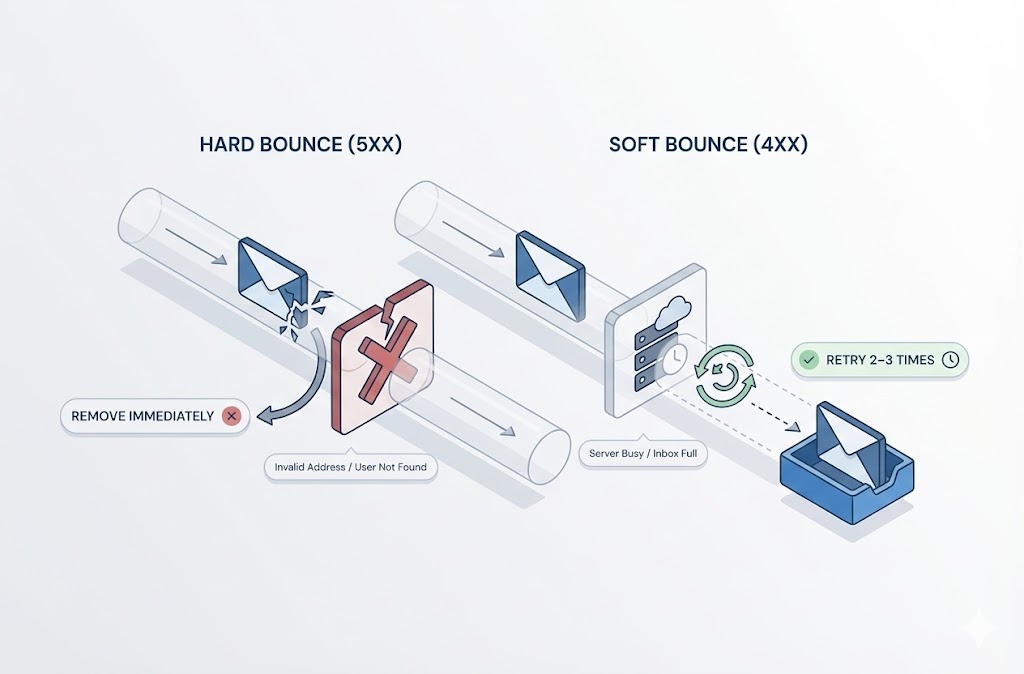
address@domain.com“ - Server responds with accept (250), reject (550), or temporary error (4xx)
For most domains, a reject response means the mailbox doesn’t exist. The tool marks it invalid. An accept response means the mailbox exists. The tool marks it valid.
Why catch-all breaks this logic:
Catch-all domains respond “accept” to every address—real or fake. The verification tool has no way to differentiate.
| Domain Type | Test Address: real@domain.com | Test Address: fake123@domain.com | Verification Usefulness |
|---|---|---|---|
| Standard domain | 250 OK (Valid) | 550 Reject (Invalid) | High — clear signal |
| Catch-all domain | 250 OK (?) | 250 OK (?) | Low — no differentiation |
The catch-all result is verification honesty, not verification failure. Your tool is telling you: “I asked the server, and the server won’t give a straight answer.”
What you’re left with:
- You know the domain exists and accepts mail
- You know the syntax is correct
- You don’t know if a human will receive your email
- You don’t know if the address is a trap, dead end, or real inbox
This uncertainty is the core problem catch-all creates for senders.
Risks of Sending to Catch-All Emails
Sending to catch-all addresses introduces risks that verified emails don’t carry. The uncertainty that makes catch-all hard to verify is the same uncertainty that can damage your sender reputation.
The four main risks:
1. Hard Bounces from Non-Existent Mailboxes
Some catch-all configurations accept emails at the server level but fail delivery internally. The message gets accepted during SMTP handshake, then bounces later when the system can’t route it to an actual inbox.
These delayed bounces still count against your sender reputation. ISPs don’t care that the server initially said “accepted.”
2. Spam Traps
Security companies and ISPs seed catch-all domains with spam trap addresses. These addresses never belonged to real users—they exist solely to catch senders with poor list hygiene.
Hitting a spam trap signals to ISPs that you’re sending to unverified or purchased lists. Consequences range from throttling to blocklisting.
3. Low Engagement Signals
Even when catch-all emails reach an inbox, they often land in unmonitored catch-all dump folders. No one opens them. No one clicks.
Gmail, Yahoo, and Microsoft track engagement as a reputation signal. Consistently low open rates from a segment of your list drag down your overall deliverability.
4. Sender Reputation Damage
The combination of bounces, traps, and low engagement compounds into reputation damage over time. This affects not just the catch-all sends but all your email from that domain.
Risk comparison by verification status:
| Verification Result | Bounce Risk | Spam Trap Risk | Engagement Risk | Safe to Send? |
|---|---|---|---|---|
| Valid | Low | Low | Normal | Yes |
| Catch-All | Medium-High | Medium | Medium-High | Depends on context |
| Invalid | Certain | Possible | N/A | No |
| Risky (Disposable/Role) | Low-Medium | Low | High | Usually no |
Catch-all sits in the uncomfortable middle—not safe enough to send blindly, not risky enough to discard entirely.
How to Verify Catch-All Emails
Standard SMTP verification cannot confirm whether a specific mailbox exists on a catch-all domain. That’s a technical fact, not a tool limitation. Any service claiming 100% accuracy on catch-all verification is overstating what’s possible.
However, verification tools can provide additional signals that help you make better decisions.
What verification can tell you about catch-all addresses:
- Syntax is valid — The address follows correct email format
- Domain exists — DNS records resolve and mail server responds
- Domain accepts mail — SMTP handshake succeeds
- Domain is catch-all — Server accepts test addresses that almost certainly don’t exist
- Risk indicators — Some tools flag disposable domains, role-based addresses, or known problematic patterns within catch-all results
What verification cannot tell you:
- Whether the specific mailbox exists
- Whether anyone monitors the inbox
- Whether the address is a spam trap
- Whether your email will bounce after acceptance
How to Handle Catch-All Results
Since verification alone can’t resolve the uncertainty, you need a process that combines verification data with other signals.
Steps to handle catch-all emails:
- Separate catch-all from your main send list — Don’t mix them with verified addresses. Treat them as a distinct segment with different rules.
- Check for additional risk flags — Some catch-all addresses also have other risk indicators (role-based like
info@,sales@, or disposable domain patterns). These warrant extra caution or exclusion. - Evaluate source quality — Where did the address come from? Opt-in from your website carries less risk than purchased lists or scraped data.
- Consider engagement history — If you’ve emailed this address before, check past behavior. Opens and clicks indicate a real person on the other end. No engagement over multiple sends suggests the opposite.
- Use risk scoring if available — Some verification tools provide confidence scores or risk tiers within catch-all results. Lower confidence addresses can be deprioritized or excluded.
- Test in small batches — If you decide to send, start with a small segment and monitor bounce rates before scaling.
BoltRoute provides configurable handling for catch-all results—you can choose how aggressively to filter them based on your risk tolerance, rather than getting a one-size-fits-all pass/fail.
Should You Send to Catch-All Emails?
The answer depends on your list source, volume tolerance, and how much reputation buffer you have. There’s no universal rule—catch-all handling is a risk management decision.
Three factors that determine your approach:
1. List Source Quality
Where the address came from is the strongest predictor of whether a catch-all email is real.
- Opt-in from your website — Someone entered their email voluntarily. Even on a catch-all domain, this is likely a real person.
- Business card or direct contact — You have context. The address was given intentionally.
- Purchased or rented list — No verification of consent. Catch-all addresses here carry maximum uncertainty.
- Scraped from websites — Could be real, could be honeypots. No way to know.
2. Volume and Percentage
Sending to 50 catch-all addresses in a 10,000-email campaign is different from sending to 2,000.
Low catch-all percentage (under 5%) with good source quality is manageable. High percentage means you’re gambling a significant portion of your send on uncertain addresses.
3. Domain Reputation Buffer
New domains and domains with limited sending history have less room for error. A few spam trap hits or high bounce rates can tank your reputation quickly.
Established domains with strong engagement history can absorb some catch-all risk. They’ve built trust with ISPs over time.
Decision matrix:
| Scenario | List Source | Catch-All % | Domain Age | Recommendation |
|---|---|---|---|---|
| A | Opt-in / Direct | Low (<5%) | Established | Send — low risk |
| B | Opt-in / Direct | High (>10%) | Established | Send in batches, monitor bounces |
| C | Opt-in / Direct | Any | New | Send small batches only |
| D | Purchased / Scraped | Low (<5%) | Established | Consider excluding or batch test |
| E | Purchased / Scraped | High (>10%) | Any | Exclude — risk too high |
| F | Purchased / Scraped | Any | New | Exclude — not worth the risk |
The practical rule:
If you can’t answer “where did this address come from?” with confidence, catch-all should be treated as a disqualifying flag. The uncertainty compounds.
If you have clear provenance and the address came from legitimate interaction, catch-all becomes a manageable risk rather than a dealbreaker.
Frequently Asked Questions
What is an example of a catch-all email?
Any email address on a domain configured as catch-all. For example, if acme.com has catch-all enabled, then sales@acme.com, xyzfake123@acme.com, and literally-anything@acme.com all get accepted by the mail server—even though only sales@acme.com might be a real mailbox.
The catch-all configuration applies to the entire domain, not individual addresses. You can’t tell from the address itself whether it’s catch-all. You only know after verification checks the server’s behavior.
How does a catch-all email work?
The domain’s mail server is configured to accept all incoming emails regardless of the recipient address. Instead of rejecting mail to non-existent mailboxes (the default behavior), it accepts everything and routes it to a designated inbox or discards it silently.
During SMTP verification, the server responds “250 OK” to any address. This prevents verification tools from distinguishing real mailboxes from fake ones.
Can catch-all emails hurt my sender reputation?
Yes. Catch-all addresses carry elevated risk for bounces, spam traps, and low engagement—all factors that ISPs use to evaluate sender reputation.
The risk level depends on list source and volume. Opt-in catch-all addresses from your own website are lower risk than catch-all addresses from purchased lists. Sending to large volumes of unverified catch-all addresses can damage your deliverability across all campaigns.
What’s the difference between catch-all and invalid?
Invalid means the verification tool confirmed the mailbox doesn’t exist. The server explicitly rejected the address. Do not send to invalid addresses.
Catch-all means the verification tool couldn’t confirm either way. The server accepts all addresses, so there’s no definitive signal. You may or may not be emailing a real person.
Status: Valid
What it means: Mailbox confirmed to exist
Server response: 250 OK (specific mailbox)
Action: Safe to send
Status: Invalid
What it means: Mailbox confirmed not to exist
Server response: 550 Reject
Action: Do not send
Status: Catch-All
What it means: Cannot confirm either way
Server response: 250 OK (all addresses)
Action: Evaluate based on context
Should I remove all catch-all emails from my list?
Not necessarily. Blanket removal means discarding potentially valid contacts. The better approach is segmentation: separate catch-all addresses, evaluate source quality, and apply appropriate handling based on your risk tolerance.
For high-quality opt-in lists, keeping catch-all addresses and monitoring performance is reasonable. For purchased or scraped lists, exclusion is safer.